

Here’s how to annotate an article: read a section, mark a useful claim or piece of support, and add a short paraphrase or question. After reading, review those notes against your purpose and explain what the article argues, what supports it, and what remains uncertain.
Annotating means adding purposeful marks and comments that record your response to a text. A highlight shows where something matters; a note explains why. You can do this on paper, in a notebook with passage references, or in a suitable digital tool.
What does annotating an article mean?
Annotation is a form of active reading: you pause to interpret, question, and connect the material rather than just moving through it. The aim is to make your thinking visible enough to use later.
Choose a purpose first. For a class discussion, you might need the author’s main points and a question worth debating. For research, you might need to judge whether the source supports a particular claim. For personal reading comprehension, you might need to explain an unfamiliar idea without looking back at the passage.
Check the assignment before adopting someone else’s method. Required symbols, note types, or source references take priority over an optional color scheme.
An annotated bibliography is a different assignment: it presents source citations with descriptive or evaluative entries, rather than simply marks on the article. Cornell’s guide explains that distinction. Confirm which output your instructor wants and which citation style applies.
How do you annotate an article step by step?
Check the task and preview the source
Check the title, author, date, source, and headings. Read any abstract for orientation, not as a substitute for the article. Decide what comes next: discussion, source comparison, answering a question, or applying an idea.
Eastern Washington University’s reading guide includes surveying the text before a closer reading. Keep the source details and page or paragraph locations with your notes so you can find the passages again.
Read a section before marking it
Read enough to understand the section’s direction before deciding what deserves attention. Look for the main ideas and how they relate. Topic sentences can help you follow a paragraph, but an important claim is not always its first sentence.
Identify the main argument. If the author gives an explicit thesis statement, mark it. If the position emerges gradually, write a provisional interpretation and revise it as you read further.
For example, “The author favors a limited trial” is more precise than “The author likes quiet rooms.” The first version leaves room for conditions and tradeoffs; the second may flatten the argument into a preference.
Mark a passage and explain its job
Highlight or underline the passage that carries the point, then write notes beside it or in a notebook with a locator. Summarize the point in your own words. If you copy the author’s wording exactly, distinguish the quotation from your response.
Ask what the passage does: states a claim, supplies supporting evidence, defines a concept, gives an example, or introduces a limitation. Numbers are not automatically proof, and an illustration is not necessarily representative evidence.
The UNC Learning Center’s annotation guidance emphasizes purposeful marks, questions, and notes in the reader’s own language. A small optional legend can help: C for claim, E for evidence, and ? for a question. Labels also work without color.
Ask questions and make relevant connections
Ask questions that test the passage: What assumption is being made? Whose perspective is absent? Does the evidence justify the conclusion, or only a narrower one?
When key terms are unfamiliar, record a brief definition or a question to resolve. Connect key concepts only when the connection helps explain the text. “This resembles the earlier example because both use requests as evidence of demand” is more useful than an unexplained “This reminds me of something.”
Lumen Learning’s annotation resource includes questions, vocabulary, and connections as possible responses. Choose the response that serves the passage; you do not need every note type beside every paragraph.
Review the notes and write a short synthesis
Return to the key points after finishing the article. Check that your account of the main ideas still fits the full text, including its qualifications.
Try a short synthesis: The author argues ___. The support shows ___. A remaining question is ___. Use a length that fits your task rather than a fixed sentence quota.
Keep questions as questions until you find answers. If your note says “Does this include weekend users?”, do not later report “Weekend users were excluded” unless the source establishes that fact.
What does a useful annotation look like?
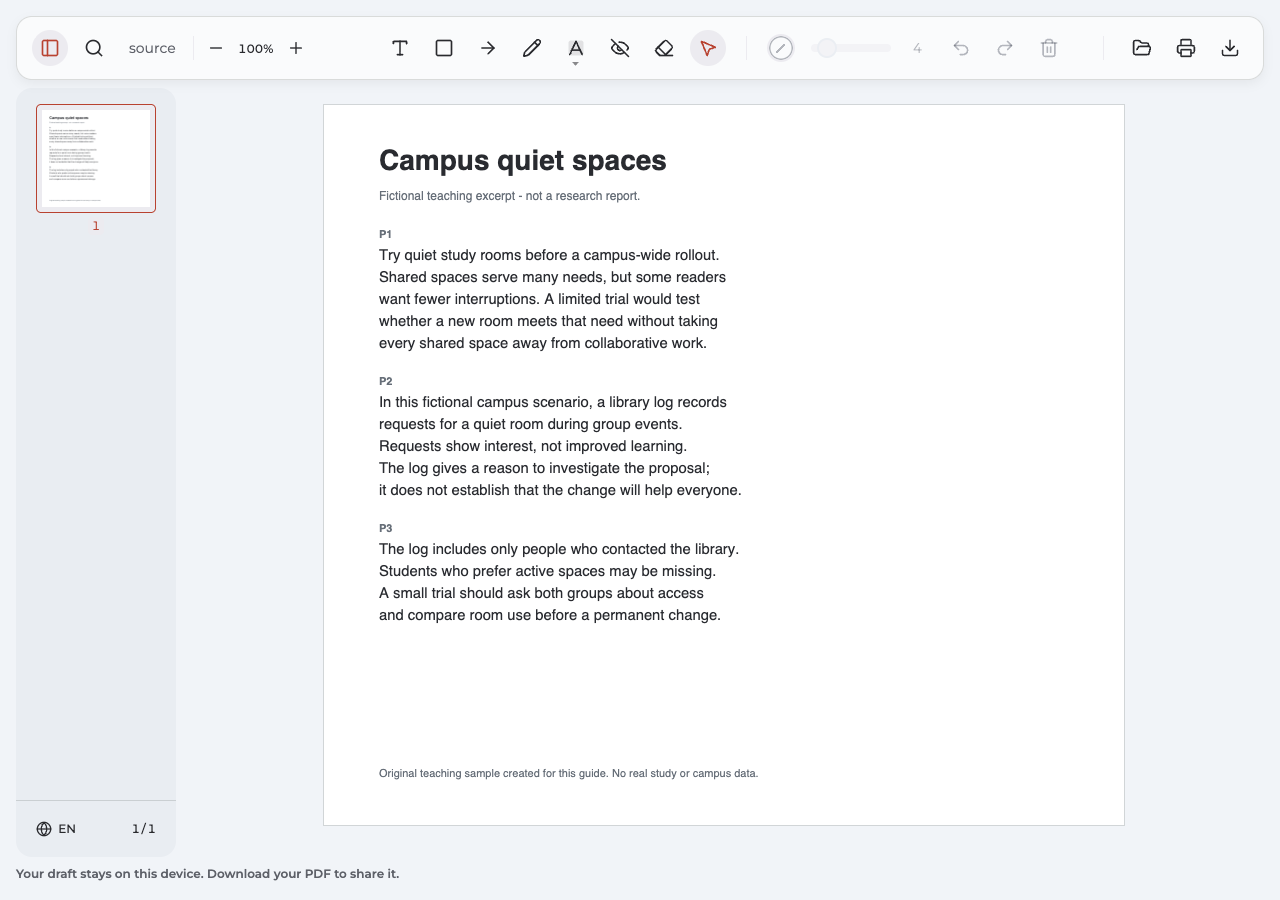
“Campus quiet spaces” is an original fictional teaching excerpt, not a research report. It contains no real campus data or study findings. The complete unmarked version is available in the PDF example below.
The excerpt proposes testing quiet study rooms before expanding them across a campus. It describes a hypothetical library log of requests and points out that people who never contacted the library are missing from that log.
| Passage and location | Model margin note | Why the note helps |
|---|---|---|
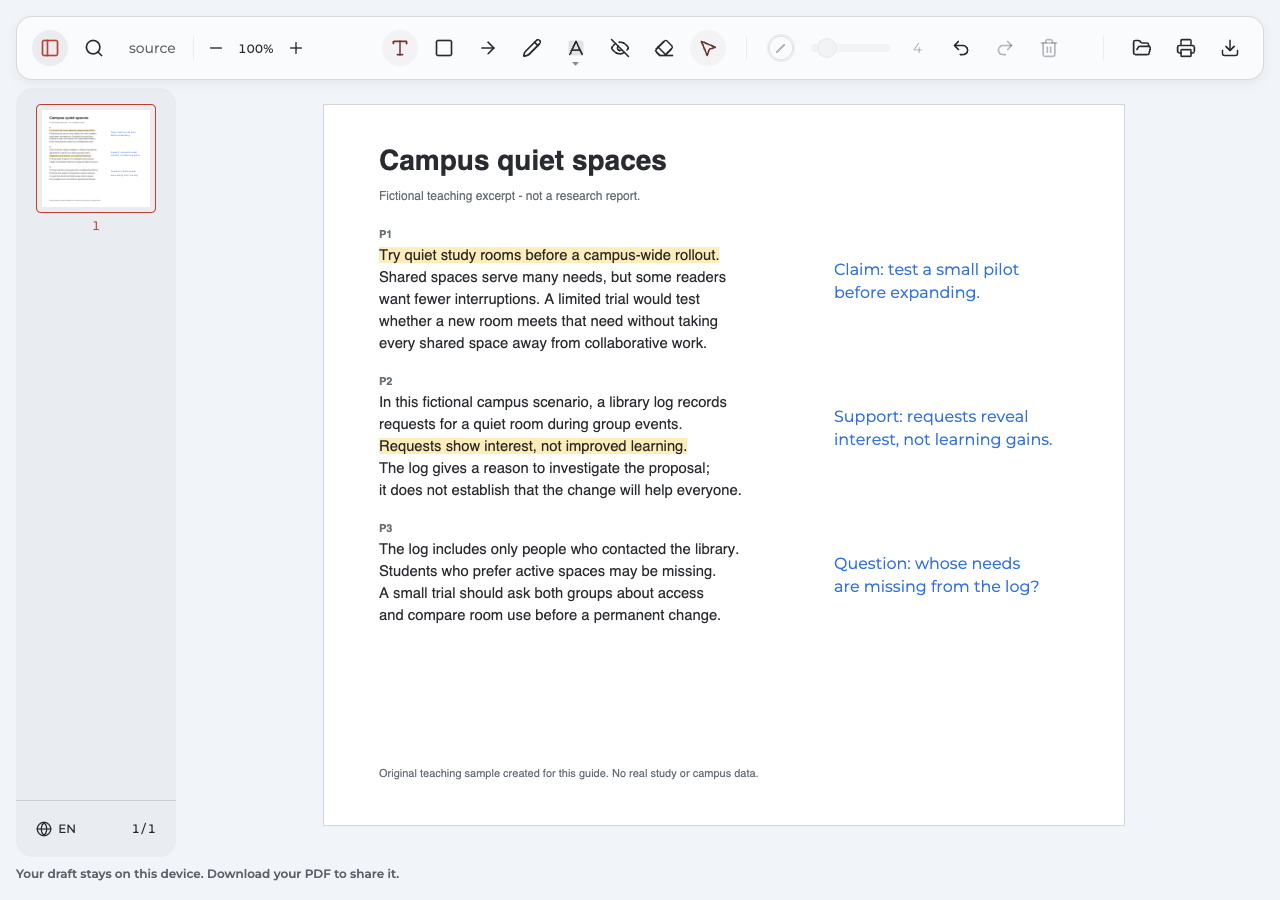
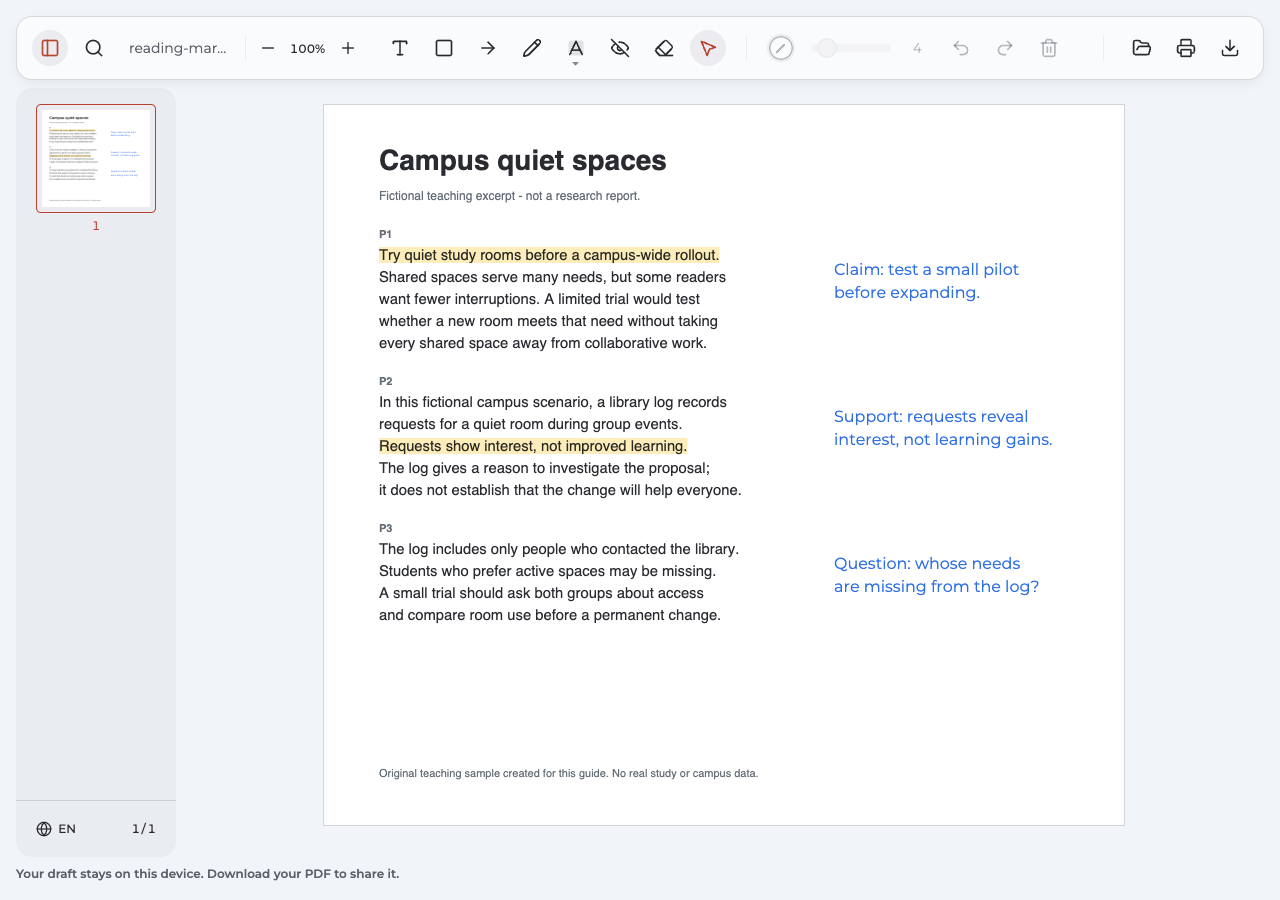
| P1: “Try quiet study rooms before a campus-wide rollout.” | Claim: test a small pilot before expanding. | Restates the proposal while preserving its limited, conditional scope. |
| P2: “Requests show interest, not improved learning.” | Support: requests reveal interest, not learning gains. | Separates what the hypothetical evidence shows from a stronger conclusion it does not establish. |
| P3: “The log includes only people who contacted the library.” | Question: whose needs are missing from the log? | Identifies a limitation and gives the reader a specific issue to investigate. |
These notes do more than label passages “important.” Each records a reason for returning to the text. The first keeps the proposal modest; the second prevents interest from becoming a claim about learning; the third directs attention to absent voices.
A possible synthesis is: The author proposes a small trial of quiet rooms. The request log gives a reason to investigate interest, but it does not establish better learning or represent every student’s needs.
That summary preserves the main ideas without pretending the fictional scenario supplies findings. It is one defensible reading, not an answer key that every reader must copy.
How could these notes become a discussion point?
Start with the difference between demand and benefit: “The requests suggest interest, but what would a trial need to measure before expansion?” Point to P2 for the limit on the evidence and P3 for the missing perspectives. You might propose asking both quiet-space and active-space users about access. Label that proposal as your contribution, not something the excerpt has already demonstrated.
How does the method change for a journal article?
Keep the same habit of marking a passage and explaining its role, but adapt the questions to the article type. For an empirical research report, look for the research question, method and sample, results, interpretation, and limitations. Ask whether the conclusions fit what was actually measured.
Excelsior OWL’s journal-article guide discusses reading research-report sections and adding paraphrases, questions, and vocabulary notes. Not every journal article is an empirical study, follows the same section order, or has the same review status.
For a table or figure, note the label, units, comparison, and relevant conditions before treating it as evidence. A striking chart does not explain itself. For a news or opinion article, examine the claim, named sources, and evidence rather than forcing it into a methods-and-results structure.
What should I do with an unfamiliar method or concept?
State what you need to learn: “Who was eligible for this sample?” Resolve the question using an appropriate source, then return to the passage. Leaving a question open is more accurate than replacing missing information with an assumption.
How can you keep the annotations in a PDF?
Paper margins and a notebook are valid options. If you use a notebook, retain page or paragraph references. For a live web article, use a website-capable annotation tool or an authorized downloaded or saved PDF, checking that its layout and source details remain usable.
The optional workflow below uses Annotate PDF in desktop Chrome. It processes PDF documents locally on your computer. It is not a live-webpage annotation service, citation manager, research library, or cloud-sync system.
Open the PDF and highlight a useful passage
Open the PDF file and choose Highlight (H). Drag across the selectable passage you want to mark. In our fictional example, the two highlights identify the limited proposal in P1 and the evidence qualification in P2.
Highlighting requires existing source words. Select (V) is for the extension’s own annotations and page panning; it is not a generic command to copy the article’s wording.
What if the article is an image-only scan?
On a supported scan, you can use a positioned Rectangle or Text note to identify a region visually. Those marks do not recognize the pictured words or make them selectable. If you need word-level selection, use a separate OCR-capable workflow and check its result. Annotate PDF does not provide OCR or edit the original wording.
Add a visible note beside the passage
Choose Text (T) and place the note in clear space beside the relevant paragraph. Put the claim or question in your own words, keeping enough detail to understand it later. Adjust Font size or color if needed, and leave the source passage readable.
Our example uses the exact three notes shown in the table. Their positions already connect them to the paragraphs, so an extra arrow is unnecessary. The colors distinguish marks from notes; they are an example, not a required reading system.
How do I correct a misplaced note or highlight?
Choose Select (V) and select your own annotation to move it or use Delete selected annotation. Undo reverses recent changes within the current editing session. If a highlight covers the wrong words, delete it and highlight the intended passage again. This does not guarantee that comments created in another app or flattened page artwork can be edited.
Export and reopen the result
Choose Export to download the marked PDF file. Open that actual download and check that every note is complete, important information remains readable, and each note is beside the intended passage.
Send or retain this checked version rather than an older attachment. Supported Annotate PDF exports with intact annotation data can restore their own marks for later editing, but the previous session’s Undo history does not return.
Compare the original fictional article with the exported annotated article.
What should I look for in the exported example?
Read P2 and its note together: “interest, not learning gains” preserves the limit on the evidence. Check that the P3 question remains visible beside its paragraph. The exported copy should keep both the reasoning and its location clear.
How to annotate an article for discussion or research
Use the notes to perform the next task, rather than treating a marked page as the finished goal. For discussion, choose a claim you can explain and a question you can locate in the text. For research, distinguish what the source establishes from what you still need to investigate.
A useful reading comprehension check is to explain the key points in your own words instead of reading your highlights aloud. Then return to the source and correct any missing qualification. Keep the citation details and passage locator with your interpretation.
| Common problem | A specific repair |
|---|---|
| Nearly every sentence is highlighted | Decide which passages serve your reading purpose and remove marks that add no distinction. |
| A note says only “important” | Replace it with what the passage claims, supports, defines, or leaves unanswered. |
| A paraphrase loses a caveat | Restore the condition: “interest” is not the same as “improved learning.” |
| Your reaction sounds like the author’s conclusion | Label your evaluation or question and retain the source wording needed to check it. |
| A digital note covers the passage or is missing from the saved copy | Reposition it, export again, and inspect the new download. |
How many annotations should I make?
Follow any assignment requirements. Otherwise, make enough notes to explain the argument and the issues relevant to your task. Instead of imposing a quota per page, check whether you can explain each note’s purpose.
Is highlighting without notes enough?
It can locate a passage, but it may not preserve your reason for marking it. Add a brief explanation where a future reader—including you—would otherwise have to guess. You do not need a comment beside every highlight if the meaning is already clear from nearby notes.
Do I need different colors?
No universal color system applies. Follow assignment instructions; otherwise, labels or symbols may be clearer. If you choose colors, use them consistently and keep important distinctions understandable from the note’s wording.